

 Loading...










Play Dr. Parking online for free, where every tight spot is a thrilling puzzle waiting to be solved! Test your driving skills as you navigate tricky parking challenges, avoiding obstacles and perfecting your precision. With simple controls and available on all your devices, Dr. Parking is ready for fun!
Whether you're practicing parallel parking or squeezing into tiny spaces, Dr. Parking helps you improve your focus and control. Collect coins as you master each level to unlock cool new cars and upgrades. Whether you're playing on a phone, tablet, or computer, Dr. Parking is packed with realistic physics and engaging missions.
Ready to become the ultimate parking pro?
About Dr. Parking
Dr. Parking is a popular parking simulation game that challenges players with realistic driving scenarios. It was first released in August 2012 and quickly gained immense popularity for its engaging gameplay and accurate physics.
The game was created by AUCTUM, a renowned developer known for creating fun and challenging mobile games. Whether you're playing on a desktop, tablet, or mobile phone, Dr. Parking is designed to offer a smooth and intuitive parking experience for everyone.
Thanks to its realistic controls and variety of challenging levels, Dr. Parking continues to be a favorite choice for kids and players of all ages who love driving and puzzle games!
Dr. Parking Gameplay
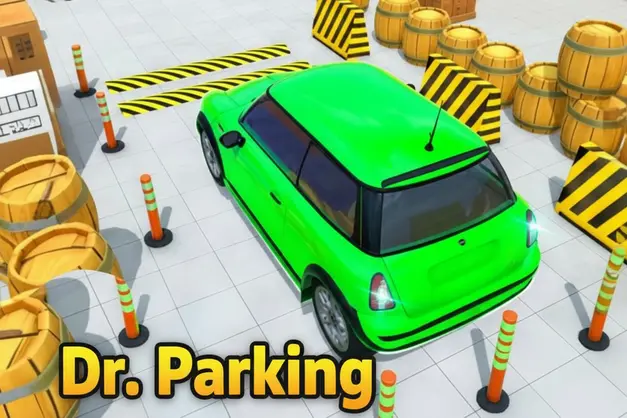
Dr. Parking is super challenging and requires real precision! You start each level behind the wheel of a car, with a clearly marked parking spot ahead. Your main goal is to carefully drive your car into the designated parking area without hitting any obstacles or other vehicles. This game isn't just about speed; it's all about control, patience, and spatial awareness.
As you progress, the levels get harder, introducing tighter spaces, more complex maneuvers like parallel parking, and moving obstacles. Dr. Parking features different cars, each with unique handling, and sometimes you'll even face a time limit, adding an extra layer of excitement. What makes this game unique compared to others is its commitment to realistic car physics and the sheer variety of challenging parking puzzles.
You’ll earn coins for successful parks, especially if you do it perfectly. These coins can be used to unlock new vehicles, each offering different stats like speed, brake power, and turning radius, which can significantly affect how you tackle future levels. Improving your car helps you handle the trickiest spots with more ease and precision, making you feel like a true parking master.
Advanced gameplay elements include different environments, from city streets to complex multi-story car parks, each presenting its own set of challenges. Your success in Dr. Parking directly connects to your ability to learn your car's dimensions and master precise steering and braking techniques, transforming you into a virtual parking expert.
Platform
You can play this game directly in your web browser, whether you're using a desktop, laptop, tablet, or mobile device.
How to Play Dr. Parking?
In Dr. Parking, your main goal is to accurately guide your chosen vehicle into a marked parking spot, avoiding any collisions with cones, walls, or other cars. The main challenges involve navigating tight corners, executing perfect parallel parks, and managing your speed to avoid even the slightest bump. You must use precise steering and careful acceleration/braking to achieve a perfect park.
The game progresses through numerous levels, each one increasing in difficulty and complexity, often adding more obstacles or stricter time limits. Successfully parking earns you coins and unlocks new levels, keeping the fun going. Failure to park within the limits or hitting too many objects will result in a failed attempt, requiring you to restart the level.
To complete a level, you simply need to park your car perfectly within the designated spot. The reward of coins and unlocking new, more powerful vehicles motivates you to keep playing and honing your parking skills to overcome even the toughest challenges.
Controls
Dr. Parking uses intuitive on-screen controls for mobile and simple keyboard controls for browser play. Here's how you control your car:
- On Computer:
- Arrow Keys: Use Up for acceleration, Down for brake/reverse, Left/Right for steering.
- Spacebar: Handbrake (for quick stops or tight turns).
- On Mobile:
- On-screen Steering Wheel/Arrows: Drag to steer left or right.
- On-screen Pedals: Tap the accelerator to go forward, and the brake pedal to slow down or reverse.
These controls are super easy to learn, letting you focus on the fun and challenge of parking like a pro!
Tips and Tricks for Dr. Parking
Want to achieve better results and become a parking master in Dr. Parking? These simple and helpful tips will improve your precision driving skills and help you unlock cool rewards:
- Go Slow: Speed is not your friend in parking! Take your time, make small adjustments, and avoid rushing.
- Use Your Mirrors: Imagine the yellow lines are your guides. Pay attention to how the car moves in reverse using the virtual rearview.
- Practice Reverse Parking: Many levels require reverse parking. Master it early, as it's key to perfect scores.
- Learn Car Dimensions: Each car feels a bit different. Understand how wide or long your current vehicle is to judge tight spaces better.
- Anticipate Turns: Start turning your wheel slightly before you reach the corner to smoothly navigate around obstacles.
- Don't Be Afraid to Adjust: If you're off course, pull forward or back up a bit to straighten out. Small corrections are better than big mistakes.
- Collect Coins: Always try to grab coins in levels, even if it means a slightly harder park. They help unlock better cars.
- Upgrade Wisely: If a car feels too hard to control, save up for one with better handling or brakes.
Follow these tips and you'll be earning perfect scores and parking like a true Dr. Parking champion!
Features of Dr. Parking
Dr. Parking is an exciting and skill-testing parking simulation game designed for players of all ages. Below are the top features that make this game so enjoyable and addictive:
- Realistic Driving Physics: Experience authentic car handling, making every turn and brake feel just like real driving.
- Variety of Cars: Unlock and drive many different vehicles, from compact cars to SUVs, each with unique handling and characteristics.
- Challenging Levels: Tackle hundreds of levels with increasing difficulty, providing endless hours of engaging parking puzzles.
- Diverse Environments: Park in various settings, including bustling city streets, multi-story car parks, and tricky back alleys.
- Precision Controls: Enjoy intuitive on-screen controls for mobile or precise keyboard inputs for browser play, ensuring accurate maneuvers.
- Time-Based Challenges: Test your speed and accuracy by completing certain levels within a strict time limit for bonus points.
- Coin & Upgrade System: Earn coins for successful parks and use them to upgrade your current cars or unlock brand new ones with improved stats.
- Visual Guidance System: Benefit from helpful guiding lines that appear in some levels, assisting you in judging your angle and position.
These features make Dr. Parking a perfect game for anyone who loves challenging driving simulations and wants to test their precision skills!
Game Details
| Developer | AUCTUM |
|---|---|
| Release Date | August 2012 |
| Genre | Parking Simulator |
| Platform | Mobile, Web Browser |
| Mode | Single-player |
Dr. Parking Online
Dr. Parking online is the special version of the popular parking simulation game that you can play right here on our website. This version has been carefully designed so that you can enjoy the game directly in your browser—without downloading or installing anything!
You can start playing Dr. Parking instantly with just one click. It works smoothly on all major web browsers, including Google Chrome, Mozilla Firefox, Microsoft Edge, Safari, and Opera. Whether you're using a computer, tablet, or mobile phone, the game is fully optimized for your device.
This is a modified edition of the original Dr. Parking, made for the best online experience. It keeps all the fun gameplay while running fast and safely on every browser.
Dr. Parking for Free
You can enjoy playing Dr. Parking for free right here on our website. This is a special modified version of the original game that allows you to play online without paying anything. No download is needed, and there are no hidden fees or in-game purchases.
Everything in the game—from challenging parking levels to unlocking new cars—is completely free. Kids and players of all ages can have fun without spending a single coin!
Also, all the games on our site are 100% free to play. We believe in fun gaming without limits or costs. Just choose a game and start playing instantly!
Can You Play Dr. Parking Unblocked?
Yes! You can play Dr. Parking unblocked anytime on our website Unblocked Games nl. Whether you're at school, in class, at work, or on a break, the game runs smoothly without any restrictions.
There's no need to download anything or bypass any blocks. Just visit our site and start parking like a pro right away. It's safe, fast, and works perfectly on any device!
- Unblocked Games 76: A popular site that offers a large variety of unblocked games, including Dr. Parking’s clean and engaging gameplay.
- Unblocked Games G+: Another great destination for games that are often blocked on school networks. Dr. Parking is featured for quick, logic‑based fun.
- Unblocked Games 6x: Offers safe, kid‑friendly titles. Dr. Parking fits perfectly with its puzzle and logic focus.
- Unblocked Games 66: Known for its extensive collection of accessible games. Dr. Parking is available for unblocked play, letting you test your skills wherever you are.
- Unblocked Games 67: Provides no-download, in‑browser games. Dr. Parking appears in the puzzle section.
- Unblocked Games 77: A robust selection of unblocked games, letting you enjoy Dr. Parking’s engaging platform for quick challenges.
Dr. Parking GitHub
Many players search for Dr. Parking GitHub versions to bypass blocks that prevent them from playing the game at school or work. While GitHub might offer some alternatives, it's often complicated and not always reliable.
But with our website nblocked Games nl , you don't need to search for GitHub versions anymore. Our version of Dr. Parking runs smoothly on all devices and networks. Whether you're in the classroom, office, or on a break — enjoy the full game online with no restrictions, no downloads, and completely for free!
Dr. Parking Download
Many fans of Dr. Parking love to download the game to their own devices for a better playing experience than just playing on the browser. Here's how you can do it:
- If your device runs on Android, just go to the Google Play Store and tap the install button to download the game.
- If you use Apple devices like iPhone or iPad, head to the Apple App Store and press the install button to get the game.
APK Dr. Parking
If you use an Android device but can't find the game in the Google Play Store, don't worry! You can search for the Dr. Parking APK file online and download it directly to your device. This way, you can install the game without using Google Play.
Also, if you love playing on your computer, you can download Dr. Parking for free from the Steam store. This lets you enjoy the game with better controls and graphics.
Dr. Parking Extension
Many fans of Dr. Parking prefer to play the game directly on their browser using a Google Chrome extension. This lets them start playing instantly without having to visit the website every time. Plus, some extensions allow you to play offline whenever you want. To download the Dr. Parking extension, click here.
Similar Games to Dr. Parking
Find More Games by Category
Frequently Asked Questions (FAQ) About Dr. Parking
-
What is Dr. Parking?
Dr. Parking is a parking simulation game where you need to carefully park various cars into designated spots without hitting obstacles. -
How do I play Dr. Parking?
Use on-screen controls (mobile) or arrow keys (computer) to steer, accelerate, and brake your car into the parking space. -
Is the game free?
Yes, Dr. Parking is free and accessible directly in the browser and as a free download on mobile app stores. -
On which platforms can I play?
The game is available on Mobile (Android, iOS) and Web Browser. -
Do I need an account to play?
No, you can start immediately without an account. -
Is the game suitable for children?
Yes, Dr. Parking is designed for all ages and features age‑friendly graphics and non-violent gameplay. -
Are there difficulty levels?
Yes, the game gets harder as you progress through levels, introducing tighter spaces and more obstacles. -
How do I progress to the next level?
You need to successfully park your car within the designated spot without crashing to move to the next level. -
Can I replay a level?
Yes, you can replay all levels at any time to improve your score or practice. -
Is the game multiplayer?
No, Dr. Parking is a solo game. There is no multiplayer mode included. -
Are there any tips for success?
Go slow, use your virtual mirrors, and practice reverse parking for better results. -
How can I improve my skills in the game?
Practice regularly, learn the unique handling of each car, and observe the best angles for entry and exit from parking spots. -
What do I do if the game is lagging or crashing?
Try clearing your browser cache, updating your browser, or playing on a different device with a stable internet connection. -
Can I play without an internet connection?
No, this game requires an internet connection to be played directly in the browser, but downloaded mobile versions can sometimes be played offline. -
How do I earn rewards or bonuses?
You can earn rewards by completing levels perfectly, parking quickly, and collecting coins scattered throughout the stages. -
What happens when I lose all my lives?
Dr. Parking usually doesn't have "lives" but if you crash too much, you simply restart the current level until you succeed. -
How often does the game get updated?
The mobile versions of Dr. Parking receive regular updates with new content, bug fixes, and performance improvements. Check the app store page for details. -
Can I customize my character or plane?
While Dr. Parking doesn’t offer character customization, you can unlock and choose from a variety of different car models and colors. -
How do I unlock new levels or stages?
New levels unlock automatically after completing the previous level successfully. -
Is there any way to save my progress?
Yes, your progress in Dr. Parking is usually automatically saved through the game's internal system or your device's local storage.
Is Dr. Parking a good game for learning to drive?
Dr. Parking can help develop spatial awareness and precision control, which are useful skills for learning to drive, though it's not a substitute for real-world driving lessons.
Can I play Dr. Parking with a joystick or controller?
While primarily designed for touch or keyboard, some browser versions or mobile emulators might allow for controller input, but it's not an officially supported feature.
Conclusion
Dr. Parking is a fantastic and addictive game that challenges your precision and patience, making it super enjoyable for kids and adults alike. It helps you develop excellent spatial awareness and fine motor skills, all while having a blast trying to master tricky parking spots. The game is incredibly accessible, offering easy-to-learn controls and a smooth experience across various devices.
Whether you're using a phone, tablet, or computer, Dr. Parking is ready to play for free right in your browser. Its engaging levels and realistic physics provide endless entertainment without any cost or complicated downloads. It's the perfect way to have fun and test your driving talents!
So, grab your virtual keys and start playing today! Challenge your friends to see who can get the highest scores, and before you know it, you'll be a true Dr. Parking master!