

 Loading...











Play Cooking Korean Lesson online for free, where you can step into a virtual kitchen and learn how to make delicious Asian dishes! Have you ever wanted to cook yummy food like Bibimbap or spicy Kimchi? This game makes it super fun and easy to become a master chef without making a mess in real life. It is simple to pick up, so you can start chopping, frying, and mixing ingredients right away.
In this tasty adventure, you will unlock new recipes and learn the secrets of Korean cuisine. Whether you're playing on a phone, tablet, or computer, Cooking Korean Lesson is packed with colorful graphics, realistic cooking sounds, and step-by-step guides that make every dish turn out perfect.
Are you ready to put on your apron and cook up a storm?
About Cooking Korean Lesson
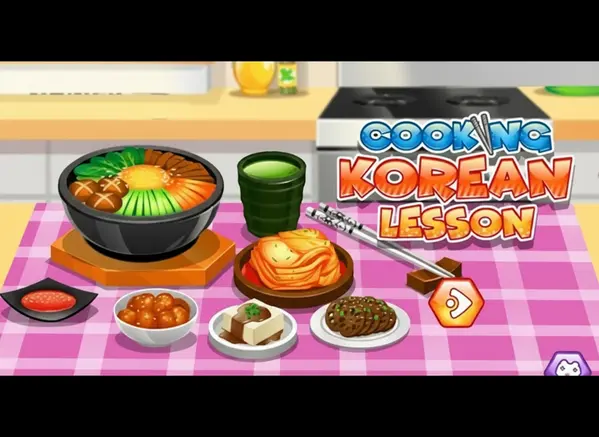
Cooking Korean Lesson is an engaging cooking simulation game that teaches players how to prepare traditional Korean meals. It was first released in November 2019 and quickly became popular among kids who love food and creativity.
The game was created by GoGy Games, a developer known for making fun and educational games for children. Whether you're playing on a desktop, tablet, or mobile phone, Cooking Korean Lesson is designed to be intuitive, helping you learn the order of ingredients and cooking methods while having a great time.
Thanks to its mouth-watering visuals and easy-to-follow instructions, Cooking Korean Lesson continues to be a favorite choice for kids and players of all ages who love culinary games!
Cooking Korean Lesson Gameplay
Cooking Korean Lesson is easy to learn but requires attention to detail! You start by choosing a recipe, such as Kimchi or Bibimbap. Your main goal is to follow the arrow indicators to chop vegetables, boil water, and mix spices correctly. You need steady hands and good timing to make sure the food doesn't burn.
As you progress, you get to try different recipes that require more steps. The game features realistic kitchen tools like knives, frying pans, and mixing bowls. What makes this game unique is how it breaks down complex recipes into fun, mini-games where you simulate the actual actions of cooking.
You will slice green onions, marinate cabbage, and crack eggs just like a real chef. There are no complicated upgrades, but the satisfaction comes from completing a dish perfectly and seeing the delicious final result presented on the screen.
While there aren't different environments, the challenge lies in your precision. If you follow the steps exactly as shown, you will create a 5-star meal. It connects your ability to follow instructions with the reward of a beautiful virtual dish.
Platform
You can play this game directly in your web browser, whether you're using a desktop, laptop, tablet, or mobile device.
How to Play Cooking Korean Lesson?
In Cooking Korean Lesson, your main goal is to prepare a specific Korean dish by following the on-screen recipe. You must complete tasks like slicing vegetables, turning on the stove, and adding the right amount of sauce. You need to follow the visual hints—usually arrows or hand icons—to know what to do next.
The game guides you through the process, so it doesn't get too difficult, but you need to be precise. There aren't specific failure conditions that make you lose the game immediately, but doing things out of order might confuse the process. If you get stuck, look for the glowing hint on the screen.
The game ends when the dish is fully prepared and ready to serve. Your reward is seeing the tasty meal you created and unlocking the option to try the next recipe!
Controls
Cooking Korean Lesson uses simple point-and-click or touch mechanics. Here's how you control the kitchen tools:
- On Computer:
- Mouse Left Click: Select ingredients or pick up tools.
- Click and Drag: Slice vegetables, stir soups, or move items to the pan.
- On Mobile:
- Tap: Select items.
- Swipe: Cut food or stir the bowl.
The controls are very responsive, making it easy for anyone to feel like a master chef in seconds.
Tips and Tricks for Cooking Korean Lesson
Want to become a top chef in Cooking Korean Lesson? These simple and helpful tips will improve your cooking skills and help you make the best dishes:
- Follow the Arrows: Always look for the arrow guides; they show you exactly which direction to slice or stir.
- Be Precise: When cutting vegetables, try to stay on the dotted lines for the best results.
- Wait for Prompts: Don't click too fast! Wait for the animation to finish before moving to the next step.
- Check the Heat: When frying or boiling, make sure you turn off the stove when the game tells you to.
- Memorize Steps: If you replay a recipe, try to remember the order of ingredients to move faster.
- Use Full Swipes: On mobile, make long, clear swipes to chop effectively.
- Watch the Timer: Some steps might require you to wait a few seconds for the food to cook properly.
- Have Fun: Take your time to enjoy the visuals of the yummy food you are making!
Follow these tips and you'll be cooking like a pro in no time!
Features of Cooking Korean Lesson
Cooking Korean Lesson is a delightful simulation designed for players of all ages. Below are the top features that make this game so enjoyable and addictive:
- Authentic Recipes: Learn how to make real dishes like Kimchi and Bibimbap.
- Interactive Steps: Actually slice, dice, fry, and mix ingredients using your mouse or finger.
- Helpful Guides: Visual arrows and hints make sure you never get lost in the recipe.
- Colorful Graphics: The ingredients look fresh and the final dishes look delicious.
- Kid-Friendly: Safe content with no violence, just pure cooking fun.
- No Mess: Enjoy the fun of cooking without having to clean up a dirty kitchen afterward.
- Educational Value: Teaches the basics of following instructions and the order of cooking operations.
- Mobile Optimized: Works perfectly on touchscreens for a hands-on experience.
These features make Cooking Korean Lesson a perfect game for anyone who loves food and cooking adventures!
Game Details
| Developer | GoGy Games |
|---|---|
| Release Date | November 2019 |
| Genre | Cooking Simulation |
| Platform | Browser (HTML5), Mobile, Tablet |
| Mode | Single Player |
Cooking Korean Lesson Online
Cooking Korean Lesson online is the special version of the popular cooking game that you can play right here on our website. This version has been carefully designed so that you can enjoy the game directly in your browser—without downloading or installing anything!
You can start playing Cooking Korean Lesson instantly with just one click. It works smoothly on all major web browsers, including Google Chrome, Mozilla Firefox, Microsoft Edge, Safari, and Opera. Whether you're using a computer, tablet, or mobile phone, the game is fully optimized for your device.
This is a modified edition of the original Cooking Korean Lesson, made for the best online experience. It keeps all the fun gameplay while running fast and safely on every browser.
Cooking Korean Lesson for Free
You can enjoy playing Cooking Korean Lesson for free right here on our website. This is a special modified version of the original game that allows you to play online without paying anything. No download is needed, and there are no hidden fees or in-game purchases.
Everything in the game—from the ingredients to the final recipes—is completely free. Kids and players of all ages can have fun without spending a single coin!
Also, all the games on our site are 100% free to play. We believe in fun gaming without limits or costs. Just choose a game and start playing instantly!
Can You Play Cooking Korean Lesson Unblocked?
Yes! You can play Cooking Korean Lesson unblocked anytime on our website Unblocked Games nl. Whether you're at school, in class, at work, or on a break, the game runs smoothly without any restrictions.
There's no need to download anything or bypass any blocks. Just visit our site and start cooking delicious meals right away. It's safe, fast, and works perfectly on any device!
- Unblocked Games 76: A popular site that offers a large variety of unblocked games, including Cooking Korean Lesson’s clean and engaging gameplay.
- Unblocked Games G+: Another great destination for games that are often blocked on school networks. Cooking Korean Lesson is featured for quick, culinary fun.
- Unblocked Games 6x: Offers safe, kid‑friendly titles. Cooking Korean Lesson fits perfectly with its creative focus.
- Unblocked Games 66: Known for its extensive collection of accessible games. Cooking Korean Lesson is available for unblocked play, letting you test your chef skills wherever you are.
- Unblocked Games 67: Provides no-download, in‑browser games. Cooking Korean Lesson appears in the simulation section.
- Unblocked Games 77: A robust selection of unblocked games, letting you enjoy Cooking Korean Lesson’s engaging platform for quick challenges.
Cooking Korean Lesson GitHub
Many players search for Cooking Korean Lesson GitHub versions to bypass blocks that prevent them from playing the game at school or work. While GitHub might offer some alternatives, it's often complicated and not always reliable.
But with our website Unblocked Games nl , you don't need to search for GitHub versions anymore. Our version of Cooking Korean Lesson runs smoothly on all devices and networks. Whether you're in the classroom, office, or on a break — enjoy the full game online with no restrictions, no downloads, and completely for free!
Cooking Korean Lesson Download
Many fans of Cooking Korean Lesson love to download the game to their own devices for a better playing experience than just playing on the browser. Here's how you can do it:
- If your device runs on Android, just go to the Google Play Store and tap the install button to download the game.
- If you use Apple devices like iPhone or iPad, head to the Apple App Store and press the install button to get the game.
APK Cooking Korean Lesson
If you use an Android device but can't find the game in the Google Play Store, don't worry! You can search for the Cooking Korean Lesson APK file online and download it directly to your device. This way, you can install the game without using Google Play.
Also, if you love playing on your computer, you can download Cooking Korean Lesson for free from the Steam store. This lets you enjoy the game with better controls and graphics.
Cooking Korean Lesson Extension
Many fans of Cooking Korean Lesson prefer to play the game directly on their browser using a Google Chrome extension. This lets them start playing instantly without having to visit the website every time. Plus, some extensions allow you to play offline whenever you want. To download the Cooking Korean Lesson extension, click here.
Similar Games to Cooking Korean Lesson
Find More Games by Category
Frequently Asked Questions (FAQ) About Cooking Korean Lesson
-
What is Cooking Korean Lesson?
Cooking Korean Lesson is a game where you need to prepare traditional Korean dishes by following recipes and simulating kitchen tasks. -
How do I play Cooking Korean Lesson?
Use the mouse or touch controls to click (or tap) on ingredients, drag tools to chop, and follow the arrows to complete the cooking steps. -
Is the game free?
Yes, Cooking Korean Lesson is free and accessible directly in the browser. -
On which platforms can I play?
The game is available on Desktop, Laptops, Tablets, and Smartphones. -
Do I need an account to play?
No, you can start immediately without an account. -
Is the game suitable for children?
Yes, Cooking Korean Lesson is designed for all ages and features age‑friendly graphics. -
Are there difficulty levels?
Yes, the game gets slightly harder as you unlock more complex recipes with more steps. -
How do I progress to the next level?
You need to complete the current dish perfectly to move to the next recipe. -
Can I replay a level?
Yes, you can replay all levels at any time to improve your cooking speed. -
Is the game multiplayer?
No, Cooking Korean Lesson is a solo game. There is no multiplayer mode included. -
Are there any tips for success?
Follow the visual hints closely and don't rush the chopping steps to ensure accuracy. -
How can I improve my skills in the game?
Practice regularly, learn the patterns of each recipe, and pay attention to the cooking timers to prevent burning food. -
What do I do if the game is lagging or crashing?
Try clearing your browser cache, updating your browser, or playing on a different device with a stable internet connection. -
Can I play without an internet connection?
No, this game requires an internet connection to be played directly in the browser. -
How do I earn rewards or bonuses?
You can earn satisfaction by completing dishes perfectly, which unlocks the next tasty recipe in the cookbook. -
What happens if I make a mistake?
You might have to redo a step, but the game is forgiving and lets you try again until you get it right. -
How often does the game get updated?
The game receives updates occasionally. Check the game website for details on any new recipes added. -
Can I customize my kitchen?
While the game doesn’t offer deep kitchen customization, you use different tools automatically depending on the recipe. -
How do I unlock new recipes?
New recipes unlock automatically after completing the previous dish successfully. -
Is there any way to save my progress?
Yes, your progress is automatically saved through your browser’s local storage so you can continue cooking later.
What dishes can I cook in the game?
You can cook popular Korean dishes such as Bibimbap and traditional Kimchi, learning the ingredients for each.
Is Cooking Korean Lesson educational?
Yes, it teaches players the names of ingredients and the general process of preparing Korean food in a fun way.
Do I need to know how to cook in real life?
Not at all! The game guides you through every single step, making it easy for anyone to play regardless of cooking skill.
Can I play this on my iPhone?
Yes, the game is HTML5 optimized, so it works perfectly on Safari on your iPhone or iPad.
Does the game have sound?
Yes, it features realistic sound effects like chopping, sizzling, and boiling to make the cooking experience feel real.
Is there a time limit?
There is usually no strict time limit, allowing you to relax and enjoy the cooking process at your own pace.
What happens if I burn the food?
If you leave food on the stove too long, you may have to restart that specific step of the recipe.
Can I serve the food to customers?
In this specific game, the focus is on the lesson and preparation, presenting the final dish to you as the player.
Is there violence in the game?
No, this is a completely non-violent, family-friendly game suitable for even the youngest players.
How do I pause the game?
Since it is a browser game, you can simply stop clicking or open a new tab to effectively pause the action.
Does it require a fast computer?
No, Cooking Korean Lesson is very lightweight and runs smoothly on almost any computer or Chromebook.
Are the recipes real?
Yes, the game is based on real Korean recipes, though the steps are simplified for gameplay fun.
Can I mix random ingredients?
No, you must follow the specific recipe to succeed, unlike some sandbox cooking games.
Is there background music?
Yes, the game features cheerful and relaxing background music to keep the mood light while you cook.
Where is the best place to play this?
The best place to play is right here on Unblocked Games nl for a safe and fast experience.
Conclusion
Cooking Korean Lesson is a fantastic way to explore the world of Asian cuisine without leaving your chair. It combines the fun of gaming with the excitement of learning new recipes, making it a great choice for kids who want to develop their coordination skills. With its easy controls and helpful guides, anyone can become a virtual chef in minutes.
Whether you are playing on a tablet, a phone, or a school Chromebook, this game is free and accessible to everyone. It is a safe, family-friendly game that offers endless entertainment without costing a penny. You can jump in right now and start chopping vegetables for your first Kimchi!
So, what are you waiting for? Put on your chef's hat and start playing Cooking Korean Lesson today. Don't forget to share the game with your friends to see who can make the most delicious-looking Bibimbap!