

 Loading...










Play Geometry Dash Arrow online for free, a fast-paced rhythm adventure that tests your reflexes and timing like never before. Navigate through dangerous geometric worlds, dodge sharp spikes, and listen to the beat as you fly your rocket-like arrow to victory. With simple one-touch controls, this game is easy to pick up but incredibly tough to master, making it perfect for playing on your phone, tablet, or school computer.
In this exciting version of the classic dash series, you will face new challenges where speed is everything. Whether you're playing on a phone, tablet, or computer, Geometry Dash Arrow is packed with neon graphics, pumping music, and tricky levels that keep you coming back for more.
Are you ready to test your skills and conquer the impossible?
About Geometry Dash Arrow
Geometry Dash Arrow is an electrifying rhythm-based platformer where players control a geometric shape navigating through hazardous environments. It is based on the massively popular franchise that was first released in August 2013 and has since become a global phenomenon among gamers who love high-speed challenges.
The original concept was created by RobTop Games, a developer known for making addictive arcade games. Whether you're playing on a desktop, tablet, or mobile phone, Geometry Dash Arrow is designed to test your reaction time and rhythmic sense, following the philosophy that gameplay should be simple to understand but difficult to perfect.
Thanks to its catchy soundtracks and colorful visual style, Geometry Dash Arrow continues to be a favorite choice for kids and players of all ages who love action-packed arcade games!
Geometry Dash Arrow Gameplay
Geometry Dash Arrow is known for being challenging yet super rewarding! You start at the beginning of a neon-lit level, and your main goal is to reach the finish line without crashing into any obstacles. You need sharp eyes and quick fingers to survive the journey.
As you move forward, the game introduces the unique "Wave" mechanic, often referred to as the Arrow. In this mode, holding the button moves you diagonally up, and letting go drops you diagonally down. This zig-zag movement pattern makes this version unique compared to standard jumping games, requiring precise control to navigate through tight tunnels and sawblades.
The gameplay relies heavily on the background music. Spikes, platforms, and portals often sync with the beat of the song. You will encounter portals that change your size, speed, or gravity, adding layers of complexity. Unlocking new colors and icons allows you to customize your character as you get better.
Advanced levels require memorization and practice. You might crash many times, but instant respawns keep the action going. The connection between player skill and game success is strong—the more you play, the better you get at anticipating the next move.
Platform
You can play this game directly in your web browser, whether you're using a desktop, laptop, tablet, or mobile device.
How to Play Geometry Dash Arrow?
In Geometry Dash Arrow, your main goal is to guide your avatar through a gauntlet of geometric hazards to the end of the music track. You must avoid touching spikes, hitting walls, or crashing into buzzsaws. Timing your clicks or taps to the rhythm of the music is the best strategy for success.
The game features a progression of difficulty. Early sections might be slow and spacious, but soon you will face narrow corridors and fast speeds. If you crash, you must restart the level from the beginning, unless you are in practice mode. This creates a high-stakes environment where every percentage point of progress feels like a victory.
To win, you must reach 100% completion of the level. Doing so gives you immense satisfaction and often unlocks new icons or colors to show off your achievement.
Controls
Geometry Dash Arrow uses simple one-touch mechanics. Here's how you control your character:
- On Computer:
- Spacebar / Up Arrow / Left Click: Press and hold to fly up diagonally; release to slide down diagonally (Wave Mode). Tap to jump (Cube Mode).
- P Key: Pause the game.
- On Mobile:
- Tap Screen: Tap anywhere to jump or hold to fly up.
- Release Screen: Stop flying up to move downwards.
These controls are incredibly easy to learn, allowing anyone to start playing immediately without a tutorial.
Tips and Tricks for Geometry Dash Arrow
Want to beat the hardest levels in Geometry Dash Arrow? These simple and helpful tips will improve your timing and help you unlock cool rewards:
- Listen to the Music: The obstacles usually sync with the beat, so use your ears as much as your eyes.
- Use Practice Mode: Drop checkpoints to practice difficult sections without starting over every time.
- Look Ahead: Don't stare at your character; look at the right side of the screen to see what is coming next.
- Don't Hold Too Long: In Wave/Arrow mode, light taps allow for tighter movement than long holds.
- Stay Calm: Getting frustrated leads to mistakes. Take a deep breath if you keep crashing.
- Memorize Patterns: Many levels require you to memorize the layout rather than just reacting.
- Ignore Distractions: The background effects are cool but can be distracting; focus strictly on the obstacles.
- Take Breaks: If your fingers get tired, pause the game and rest to maintain your reflexes.
Follow these tips and you'll be conquering demon-level difficulties in no time!
Features of Geometry Dash Arrow
Geometry Dash Arrow is an arcade masterpiece designed for players of all ages. Below are the top features that make this game so enjoyable and addictive:
- Rhythm-Based Action: The gameplay is perfectly synchronized with high-energy electronic music.
- Unique Wave Mechanic: Experience the distinct diagonal flight movement that sets the "Arrow" mode apart.
- Vibrant Graphics: Enjoy colorful, neon-style visuals that change as you progress through the level.
- Instant Respawn: Get back into the action immediately after crashing, keeping the pace fast.
- Practice Mode: A helpful feature that lets you place checkpoints to learn tricky parts of the level.
- Character Customization: Unlock new colors and skins for your geometric avatar.
- Cross-Platform Play: Works smoothly on both computers and mobile devices without lag.
- Challenging Levels: Difficulty ranges from easy for beginners to near-impossible for experts.
These features make Geometry Dash Arrow a perfect game for anyone who loves music, speed, and testing their reflexes!
Game Details
| Developer | RobTop Games (Original Concept) |
|---|---|
| Release Date | August 2013 (Franchise) |
| Genre | Rhythm Platformer / Arcade |
| Platform | Web Browser, Android, iOS, PC |
| Mode | Single Player |
Geometry Dash Arrow Online
Geometry Dash Arrow online is the special version of the popular rhythm game that you can play right here on our website. This version has been carefully designed so that you can enjoy the game directly in your browser—without downloading or installing anything!
You can start playing Geometry Dash Arrow instantly with just one click. It works smoothly on all major web browsers, including Google Chrome, Mozilla Firefox, Microsoft Edge, Safari, and Opera. Whether you're using a computer, tablet, or mobile phone, the game is fully optimized for your device.
This is a modified edition of the original Geometry Dash Arrow, made for the best online experience. It keeps all the fun gameplay while running fast and safely on every browser.
Geometry Dash Arrow for Free
You can enjoy playing Geometry Dash Arrow for free right here on our website. This is a special modified version of the original game that allows you to play online without paying anything. No download is needed, and there are no hidden fees or in-game purchases.
Everything in the game—from the levels to the practice mode—is completely free. Kids and players of all ages can have fun without spending a single coin!
Also, all the games on our site are 100% free to play. We believe in fun gaming without limits or costs. Just choose a game and start playing instantly!
Can You Play Geometry Dash Arrow Unblocked?
Yes! You can play Geometry Dash Arrow unblocked anytime on our website Unblocked Games nl. Whether you're at school, in class, at work, or on a break, the game runs smoothly without any restrictions.
There's no need to download anything or bypass any blocks. Just visit our site and start dodging spikes right away. It's safe, fast, and works perfectly on any device!
- Unblocked Games 76: A popular site that offers a large variety of unblocked games, including Geometry Dash Arrow’s clean and engaging gameplay.
- Unblocked Games G+: Another great destination for games that are often blocked on school networks. Geometry Dash Arrow is featured for quick, logic‑based fun.
- Unblocked Games 6x: Offers safe, kid‑friendly titles. Geometry Dash Arrow fits perfectly with its puzzle and logic focus.
- Unblocked Games 66: Known for its extensive collection of accessible games. Geometry Dash Arrow is available for unblocked play, letting you test your skills wherever you are.
- Unblocked Games 67: Provides no-download, in‑browser games. Geometry Dash Arrow appears in the puzzle section.
- Unblocked Games 77: A robust selection of unblocked games, letting you enjoy Geometry Dash Arrow’s engaging platform for quick challenges.
Geometry Dash Arrow GitHub
Many players search for Geometry Dash Arrow GitHub versions to bypass blocks that prevent them from playing the game at school or work. While GitHub might offer some alternatives, it's often complicated and not always reliable.
But with our website nblocked Games nl , you don't need to search for GitHub versions anymore. Our version of Geometry Dash Arrow runs smoothly on all devices and networks. Whether you're in the classroom, office, or on a break — enjoy the full game online with no restrictions, no downloads, and completely for free!
Geometry Dash Arrow Download
Many fans of Geometry Dash Arrow love to download the game to their own devices for a better playing experience than just playing on the browser. Here's how you can do it:
- If your device runs on Android, just go to the Google Play Store and tap the install button to download the game.
- If you use Apple devices like iPhone or iPad, head to the Apple App Store and press the install button to get the game.
APK Geometry Dash Arrow
If you use an Android device but can't find the game in the Google Play Store, don't worry! You can search for the Geometry Dash Arrow APK file online and download it directly to your device. This way, you can install the game without using Google Play.
Also, if you love playing on your computer, you can download Geometry Dash Arrow for free from the Steam store. This lets you enjoy the game with better controls and graphics.
Geometry Dash Arrow Extension
Many fans of Geometry Dash Arrow prefer to play the game directly on their browser using a Google Chrome extension. This lets them start playing instantly without having to visit the website every time. Plus, some extensions allow you to play offline whenever you want. To download the Geometry Dash Arrow extension, click here.
Similar Games to Geometry Dash Arrow
Find More Games by Category
Frequently Asked Questions (FAQ) About Geometry Dash Arrow
-
What is Geometry Dash Arrow?
Geometry Dash Arrow is a fan-favorite mode or level style within the Geometry Dash universe where players control a wave-shaped arrow to dodge obstacles to the beat of the music. -
How do I play Geometry Dash Arrow?
Use the mouse click, spacebar, or tap the screen to move the arrow diagonally up, and release to let it slide diagonally down. -
Is the game free?
Yes, Geometry Dash Arrow is free and accessible directly in the browser. -
On which platforms can I play?
The game is available on Web Browsers (Chrome, Safari, etc.), Android, and iOS devices. -
Do I need an account to play?
No, you can start immediately without an account. -
Is the game suitable for children?
Yes, Geometry Dash Arrow is designed for all ages and features age‑friendly graphics, though it can be quite challenging. -
Are there difficulty levels?
Yes, the game gets harder as you progress through levels, with faster speeds and tighter spaces to navigate. -
How do I progress to the next level?
You need to complete the current track by reaching 100% to unlock the next challenge. -
Can I replay a level?
Yes, you can replay all levels at any time to improve your score or collect hidden coins. -
Is the game multiplayer?
No, Geometry Dash Arrow is a solo game where you compete against the level itself. There is no multiplayer mode included in the standard browser version. -
Are there any tips for success?
Use Practice Mode to place green checkpoints before difficult sections so you can master them without restarting the whole level. -
How can I improve my skills in the game?
Practice regularly, learn the patterns of each level, and listen closely to the rhythm, as the music often cues your movements. -
What do I do if the game is lagging or crashing?
Try clearing your browser cache, updating your browser, or playing on a different device with a stable internet connection. -
Can I play without an internet connection?
No, this specific browser version requires an internet connection to be played directly in the browser, though mobile app versions can be played offline. -
How do I earn rewards or bonuses?
You can earn rewards by completing levels, collecting secret coins hidden in the maps, and earning stars for your achievements. -
What happens when I lose all my lives?
There are no lives in this game; you have infinite attempts. However, crashing restarts the level from the beginning or the last checkpoint in practice mode. -
How often does the game get updated?
The game franchise receives updates with new content, levels, and icons. Check the game website for details on upcoming updates. -
Can I customize my character or plane?
Yes, you can unlock different colors and icon designs for your cube and arrow/wave form by completing achievements. -
How do I unlock new levels or stages?
New levels unlock automatically after completing the previous level or by earning a specific number of stars. -
Is there any way to save my progress?
Yes, your progress is automatically saved through your browser’s local storage.
Why is the wave mode called the arrow?
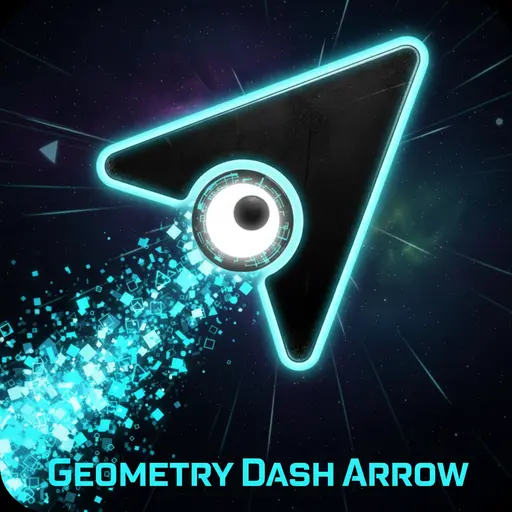
Players often call the Wave vehicle the "Arrow" because of its pointed, triangular shape that looks like an arrow head moving through the level.
What is the hardest level in the game?
Difficulty is subjective, but "Demon" rated levels are considered the hardest, requiring near-perfect timing and memory to complete.
Can I create my own levels?
The full version of the game includes a level editor, but most browser-based versions only allow you to play pre-made levels.
Does the game support gamepads?
Some versions of the game on PC allow you to use a controller, where the 'A' button usually acts as the jump/fly command.
How do I use Practice Mode?
Look for a green diamond button or press 'Z' on your keyboard to place a checkpoint, allowing you to respawn there if you crash.
What are the three gold coins for?
Each level has three hidden secret coins that provide an extra challenge; collecting them helps unlock special icons and achievements.
Is there a difference between the mobile and PC versions?
The gameplay is identical, but PC players often find using a mouse or spacebar offers more precision than a touchscreen.
Why does the game speed change?
Speed portals (arrows labeled with >>) change how fast the screen scrolls, making the game harder or easier depending on the speed.
What do the different portals do?
Portals can change your vehicle form (cube to ship), gravity (upside down), size (mini), or speed, adding variety to the gameplay.
Is the music copyrighted?
Yes, the music tracks are created by various artists (like DJVI or Waterflame) and are copyrighted, though they are free to enjoy within the game.
Can I skip a level if it is too hard?
In the main progression, you usually have to beat a level to unlock the next one, but some versions offer all levels unlocked from the start.
What is the "Dual Mode"?
Dual mode splits the screen and makes you control two characters at once, doubling the difficulty and requiring split-second thinking.
Does the game work on Chromebooks?
Yes, since it is a browser-based HTML5 or Scratch game, it runs perfectly on school Chromebooks.
How do I delete my progress?
You can usually clear your progress by clearing your browser's cookies and cache specifically for the game site.
Is Geometry Dash Arrow safe?
Yes, the game contains no violence or inappropriate content, making it safe and fun for kids of all ages.
Conclusion
Geometry Dash Arrow is a thrilling test of rhythm and reflexes that offers endless entertainment for anyone looking for a challenge. It helps develop hand-eye coordination and patience while providing a fun musical experience. Because it is so easy to pick up, it appeals to both casual players and hardcore gamers alike.
With its compatibility across all devices—from smartphones to laptops—and the fact that it is completely free to play, there is no reason not to try it. It is a fantastic way for kids aged 7-18 to pass the time, offering a safe and engaging environment without any cost.
So, what are you waiting for? Click play now, turn up the volume, and see if you have the skills to reach the finish line. Don't forget to share your high scores with your friends and see who can become the ultimate Geometry Dash master!