

 Loading...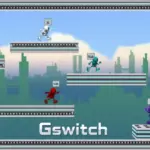








Play Gswitch online for free, the ultimate gravity-defying running game that will test your reflexes like never before! In this fast-paced adventure, you don't just jump over obstacles—you flip the entire world upside down. You control a robotic runner who can switch gravity with a single tap, allowing you to run on ceilings and floors to avoid deadly traps.
The game is perfect for quick breaks or long sessions, offering exciting coin collection and endless challenges. Whether you're playing on a phone, tablet, or computer, Gswitch is packed with futuristic action and thrilling multiplayer modes where you can race against your friends. Are you ready to defy the laws of physics and become the ultimate runner?
About Gswitch
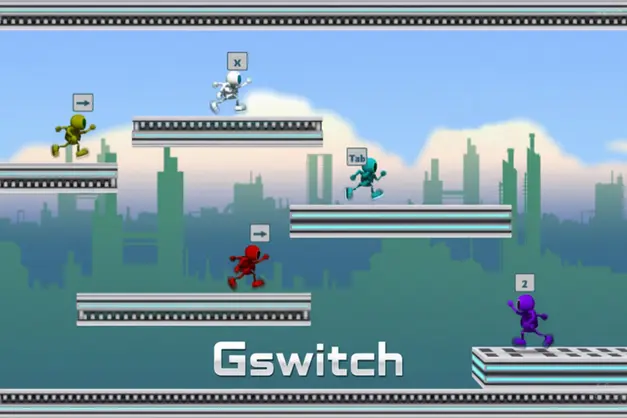
Gswitch is a high-speed endless runner platformer that introduced a unique twist to the genre: gravity switching. It was first released in 2010 and quickly became a massive hit due to its challenging gameplay and innovative multiplayer options. It was one of the first games to allow multiple people to play on a single keyboard.
The game was created by Vasco Freitas, a talented developer known for creating engaging physics-based games. Whether you're playing on a desktop, tablet, or mobile phone, Gswitch is designed to test your reaction time and coordination. The game's futuristic design and simple one-button mechanics made it an instant classic.
Thanks to its intense speed and the ability to play with up to 8 players at once, Gswitch continues to be a favorite choice for kids and players of all ages who love competitive racing games!
Gswitch Gameplay
Gswitch is known for being challenging yet incredibly addictive! You start as a small robotic character running automatically across a futuristic track. Your main goal is to run as far as possible without getting trapped by obstacles or falling off the screen. You need quick reflexes and sharp eyes to succeed.
As you progress, the game speed increases, making it harder to time your switches correctly. Unlike standard running games, you don't jump; you invert gravity. This unique mechanic means you have to constantly look ahead at both the floor and the ceiling. The game features various checkpoints, so you don't always have to start from the very beginning if you crash.
The gameplay relies heavily on timing. You must tap or click at the exact right moment to flip gravity, allowing your character to run on the ceiling to avoid a pit on the floor, or vice versa. There are no upgrades to buy that make you run faster; your success depends entirely on your skill improvement.
Advanced gameplay involves the famous multiplayer mode. Here, you and your friends run on the same screen, trying to outlast each other. The screen moves automatically, and if you get stuck behind an obstacle and disappear from the view, you are eliminated. The last player standing wins the round.
Platform
You can play this game directly in your web browser, whether you're using a desktop, laptop, tablet, or mobile device.
How to Play Gswitch?
In Gswitch, your main goal is to survive for as long as possible by flipping gravity to navigate through a maze of twisted paths. You must avoid gaps in the track and solid walls that block your way. If you mistime a switch, you might fly off into space or get crushed by the scrolling screen. You must anticipate the path ahead to stay alive.
The game features endless runner elements where the difficulty ramps up the further you go. In Story Mode, you try to reach the end of the level, passing through checkpoints that save your progress. If you hit a wall or fall, you restart from the last green gate you passed.
Winning requires you to reach the finish line in single-player mode or be the last runner surviving in multiplayer mode. The satisfaction of beating a difficult level is a huge motivation to keep playing!
Controls
Gswitch uses extremely simple one-button controls, making it easy for anyone to pick up and play. Here's how you control your runner:
- On Computer:
- Single Player: Press Left Mouse Click, Spacebar, or the X key to flip gravity.
- Multiplayer: Each player is assigned a specific key (e.g., C, M, Ctrl, Right Arrow, 3) to control their specific character.
- On Mobile:
- Touch Controls: Simply Tap anywhere on the screen to switch gravity.
These simple controls mean you don't need to worry about complex buttons—just focus on your timing!
Tips and Tricks for Gswitch
Want to beat your friends and set high scores in Gswitch? These simple and helpful tips will improve your reaction speed and help you unlock cool rewards:
- Look Ahead: Don't look at your character; look at the obstacles coming up on the right side of the screen.
- Avoid Spamming: Clicking too fast can flip you into a trap. Only click when you are sure of the landing.
- Memorize Levels: In Story Mode, the track is the same every time. Learn where the tricky parts are.
- Use Checkpoints: Take a deep breath when you pass a green gate; you are safe up to that point.
- Practice Solo: Play the single-player mode to master the gravity physics before challenging friends.
- Watch the Speed: Be ready for the character to speed up suddenly on acceleration pads.
- Stay Calm: Panic clicking is the number one reason for losing. Keep a steady rhythm.
- Multiplayer Strategy: In multiplayer, try to stay in the middle of the screen so you have room to react.
Follow these tips and you'll be a gravity-flipping master in no time!
Features of Gswitch
Gswitch is a thrilling action game designed for players of all ages. Below are the top features that make this game so enjoyable and addictive:
- Gravity Flipping: Unique mechanic that lets you run on ceilings and floors.
- Multiplayer Mode: Play with up to 8 friends on a single keyboard or device.
- Endless Running: Test how far you can go in the dedicated endless mode.
- Simple Controls: One-tap gameplay makes it accessible for everyone.
- Challenging Levels: Carefully designed tracks with traps, saws, and speed boosters.
- Futuristic Graphics: Cool robotic characters and a sci-fi environment.
- Checkpoints: Save your progress mid-level so you don't have to restart from zero.
- No Download Required: Play instantly in your browser without installing large files.
These features make Gswitch a perfect game for anyone who loves fast-paced arcade challenges!
Game Details
| Developer | Vasco Freitas |
|---|---|
| Release Date | 2010 |
| Genre | Action / Runner / Platformer |
| Platform | Web Browser, Android, iOS |
| Mode | Single Player & Multiplayer (Local) |
Gswitch Online
Gswitch online is the special version of the popular gravity runner that you can play right here on our website. This version has been carefully designed so that you can enjoy the game directly in your browser—without downloading or installing anything!
You can start playing Gswitch instantly with just one click. It works smoothly on all major web browsers, including Google Chrome, Mozilla Firefox, Microsoft Edge, Safari, and Opera. Whether you're using a computer, tablet, or mobile phone, the game is fully optimized for your device.
This is a modified edition of the original Gswitch, made for the best online experience. It keeps all the fun gameplay while running fast and safely on every browser.
Gswitch for Free
You can enjoy playing Gswitch for free right here on our website. This is a special modified version of the original game that allows you to play online without paying anything. No download is needed, and there are no hidden fees or in-game purchases.
Everything in the game—from the levels to the multiplayer mode—is completely free. Kids and players of all ages can have fun without spending a single coin!
Also, all the games on our site are 100% free to play. We believe in fun gaming without limits or costs. Just choose a game and start playing instantly!
Can You Play Gswitch Unblocked?
Yes! You can play Gswitch unblocked anytime on our website Unblocked Games nl. Whether you're at school, in class, at work, or on a break, the game runs smoothly without any restrictions.
There's no need to download anything or bypass any blocks. Just visit our site and start flipping gravity right away. It's safe, fast, and works perfectly on any device!
- Unblocked Games 76: A popular site that offers a large variety of unblocked games, including Gswitch’s clean and engaging gameplay.
- Unblocked Games G+: Another great destination for games that are often blocked on school networks. Gswitch is featured for quick, reflex-based fun.
- Unblocked Games 6x: Offers safe, kid‑friendly titles. Gswitch fits perfectly with its arcade and skill focus.
- Unblocked Games 66: Known for its extensive collection of accessible games. Gswitch is available for unblocked play, letting you test your skills wherever you are.
- Unblocked Games 67: Provides no-download, in‑browser games. Gswitch appears in the action section.
- Unblocked Games 77: A robust selection of unblocked games, letting you enjoy Gswitch’s engaging platform for quick challenges.
Gswitch GitHub
Many players search for Gswitch GitHub versions to bypass blocks that prevent them from playing the game at school or work. While GitHub might offer some alternatives, it's often complicated and not always reliable.
But with our website nblocked Games nl , you don't need to search for GitHub versions anymore. Our version of Gswitch runs smoothly on all devices and networks. Whether you're in the classroom, office, or on a break — enjoy the full game online with no restrictions, no downloads, and completely for free!
Gswitch Download
Many fans of Gswitch love to download the game to their own devices for a better playing experience than just playing on the browser. Here's how you can do it:
- If your device runs on Android, just go to the Google Play Store and tap the install button to download the game.
- If you use Apple devices like iPhone or iPad, head to the Apple App Store and press the install button to get the game.
APK Gswitch
If you use an Android device but can't find the game in the Google Play Store, don't worry! You can search for the Gswitch APK file online and download it directly to your device. This way, you can install the game without using Google Play.
Also, if you love playing on your computer, you can download Gswitch for free from the Steam store. This lets you enjoy the game with better controls and graphics.
Gswitch Extension
Many fans of Gswitch prefer to play the game directly on their browser using a Google Chrome extension. This lets them start playing instantly without having to visit the website every time. Plus, some extensions allow you to play offline whenever you want. To download the Gswitch extension, click here.
Similar Games to Gswitch
Find More Games by Category
Frequently Asked Questions (FAQ) About Gswitch
-
What is Gswitch?
Gswitch is a fast-paced running game where you need to switch gravity to run on ceilings and floors to avoid obstacles. -
How do I play Gswitch?
Use the mouse click, spacebar, or touch controls to flip gravity. Timing your switches is key to survival. -
Is the game free?
Yes, Gswitch is free and accessible directly in the browser on our site. -
On which platforms can I play?
The game is available on web browsers (PC and mobile), Android, and iOS devices. -
Do I need an account to play?
No, you can start immediately without an account. -
Is the game suitable for children?
Yes, Gswitch is designed for all ages and features kid-friendly, non-violent graphics. -
Are there difficulty levels?
The game progressively gets faster and harder as you advance through the levels. -
How do I progress to the next level?
You need to survive the obstacles and reach the final gate to move to the next level. -
Can I replay a level?
Yes, you can replay levels to try and improve your score or time. -
Is the game multiplayer?
Yes, Gswitch is famous for its local multiplayer mode where up to 8 players can play on one keyboard. -
Are there any tips for success?
Focus on the upcoming obstacles, not just your character, and memorize the track layout. -
How can I improve my skills in the game?
Practice regularly in single-player mode to get a feel for the gravity physics and speed. -
What do I do if the game is lagging or crashing?
Try clearing your browser cache, closing other tabs, or playing on a different browser like Chrome. -
Can I play without an internet connection?
No, the browser version requires an internet connection, but mobile apps may work offline. -
How do I earn rewards or bonuses?
There are no coins to collect, but passing difficult checkpoints is a reward in itself! -
What happens when I lose all my lives?
Gswitch has unlimited tries. You simply respawn at the last green checkpoint you passed. -
How often does the game get updated?
The developer releases sequels (like G-Switch 2 and 3) rather than updating the original constantly. -
Can I customize my character?
In multiplayer mode, each player gets a different colored robot, but there are no skins to buy. -
How do I unlock new levels or stages?
New levels unlock automatically after you successfully complete the current track. -
Is there any way to save my progress?
Yes, your progress is automatically saved through your browser’s local cache so you can continue later.
Why is Gswitch so hard?
The game moves very fast and requires precise timing, but practicing helps you learn the patterns and get better.
Can I play Gswitch with a controller?
Some versions of the game support controllers, but the keyboard or touchscreen is the standard way to play.
Is there a Gswitch 4?
Fans are eagerly waiting for a fourth installment, but currently, Gswitch 3 is the latest version available.
What makes multiplayer mode fun?
Competing against friends on the same screen creates chaos and excitement as everyone tries to survive the longest.
Can I play Gswitch on a Chromebook?
Yes, Gswitch works perfectly on Chromebooks since it runs directly in the web browser.
Conclusion
Gswitch is an adrenaline-pumping game that offers endless fun through its unique gravity-flipping mechanics. It helps players develop quick reflexes, strategic thinking, and hand-eye coordination while providing a thrilling sci-fi adventure. The game is incredibly accessible, requiring just one button to play, making it easy for anyone to pick up but hard to master.
Whether you play on your school laptop, home tablet, or mobile phone, Gswitch is completely free and always ready for action. It’s a fantastic choice for kids aged 7-18 who want a challenge without any costs or downloads.
So, what are you waiting for? Click play now, grab your friends for a multiplayer race, and see if you have the skills to conquer gravity in Gswitch!