

 Loading...









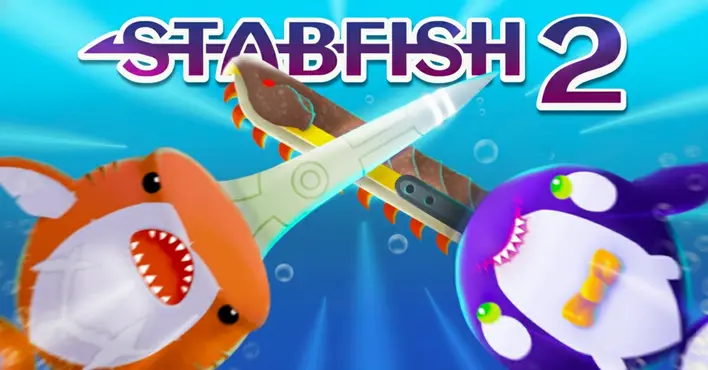
Play Stabfish 2 online for free, the ultimate underwater battle arena where only the sharpest survive! Dive deep into a colorful but dangerous ocean where you control a deadly sea monster armed with a fearsome tusk. This exciting multiplayer game is the sequel to the popular io game, bringing better graphics, physics-based combat, and tons of new features. It is incredibly easy to start but hard to master, making it perfect for quick fun on any device.
In this game, it isn't just about eating food; it is about hunting opponents, collecting loot, and crafting upgrades to become the king of the sea. Whether you're playing on a phone, tablet, or computer, Stabfish 2 is packed with cool skins, powerful weapons, and fast-paced action that keeps you on the edge of your seat. You can customize your fish and unlock special abilities as you progress.
Are you ready to sharpen your tusk and rule the ocean?
About Stabfish 2
Stabfish 2 is a fast-paced multiplayer .io game that combines survival with physics-based combat. It was first released in September 2021 and quickly became a hit thanks to its unique mechanics that allow players to craft gear and upgrade their sea beasts during the match.
The game was created by Zytech AI, a developer known for making addictive and high-quality browser games. Whether you're playing on a desktop, tablet, or mobile phone, Stabfish 2 is designed to run smoothly with vibrant graphics and responsive controls, focusing on skill and timing rather than just size.
Thanks to its deep crafting system and competitive gameplay, Stabfish 2 continues to be a favorite choice for kids and players of all ages who love action-packed arena battles!
Stabfish 2 Gameplay
Stabfish 2 is thrilling and moderately challenging! You start as a small marine creature with a basic weapon. Your main goal is to stab other players with your tusk while protecting your own body. To succeed, you need quick reflexes and smart movement to outmaneuver your enemies.
As you defeat enemies, they drop meat and loot. Eating meat helps you grow larger and gain a higher score, while loot allows you to craft upgrades. The game features a unique "Armageddon" event and ghost mechanics, making it unique compared to standard shark games. The difficulty increases as you encounter bigger, better-equipped players in the arena.
The core gameplay revolves around a physics engine. Your weapon swings based on your movement, adding a layer of strategy. You can collect blueprints and materials to upgrade your tusk and body armor in real-time. Improving your gear increases your speed, damage, and defense.
Advanced players learn to utilize the dash mechanic effectively to secure kills or escape danger. The environment is an open ocean, but staying near the center usually means more action and higher risk. Your success depends entirely on your ability to read your opponent's movements and strike at the perfect moment.
Platform
You can play this game directly in your web browser, whether you're using a desktop, laptop, tablet, or mobile device.
How to Play Stabfish 2?
In Stabfish 2, your main goal is to become the biggest and strongest beast in the ocean by eliminating other players. You must navigate the dangerous waters, avoiding the sharp tusks of your enemies while trying to impale them with your own. The ocean is full of rivals, so you must always watch your back.
Progression happens through looting and crafting. When you defeat a foe, grab the materials they drop. Use these to upgrade your stats instantly. If you get stabbed, it's game over, but you can restart quickly to try again. The pressure rises as you climb the leaderboard and become a prime target for everyone else.
The game ends for you when you run out of health or get fatally stabbed. However, scoring high points unlocks new skins and starting loadouts, giving you plenty of motivation to continue playing and improving your skills.
Controls
Stabfish 2 uses simple, intuitive controls that make it easy for anyone to pick up and play. Here's how you control your sea monster:
- On Computer:
- Mouse: Move your cursor to steer your fish.
- Left Click: Activate speed boost (uses stamina).
- On Mobile:
- Touch: Drag your finger on the screen to move.
- Tap Screen (or Button): Activate speed boost.
The character follows your mouse or finger automatically, making the game very responsive and easy to learn.
Tips and Tricks for Stabfish 2
Want to dominate the leaderboard in Stabfish 2? These simple and helpful tips will improve your combat skills and help you unlock cool rewards:
- Aggressive Defense: Keep your tusk facing your enemies at all times to block incoming attacks.
- Loot Quickly: After a kill, grab the loot immediately before other scavengers steal it.
- Manage Stamina: Don't use all your boost at once; save some for escaping dangerous situations.
- Upgrade Smartly: Use the crafting menu as soon as you have materials to get an advantage over new spawns.
- Corner Traps: Try to trap opponents against the edge of the map where they have less room to dodge.
- Attack from Behind: The safest way to defeat a large enemy is to boost into their side or tail.
- Watch for Ghosts: Sometimes defeated players linger; be careful not to get distracted by them.
- Chain Kills: Killing enemies refills your boost bar, allowing you to chain attacks together.
Follow these tips and you'll be ruling the ocean in no time!
Features of Stabfish 2
Stabfish 2 is an action-packed game designed for players of all ages. Below are the top features that make this game so enjoyable and addictive:
- Physics Combat: Weapons swing realistically based on your movement inertia.
- Crafting System: Collect loot to upgrade your tusk and armor during the game.
- Many Species: Unlock sharks, whales, and other sea creatures with unique stats.
- Multiplayer Action: Battle against real players from around the world in real-time.
- Team Modes: Join forces with friends or random players to dominate the server.
- Customization: distinct skins and accessories to make your fish look unique.
- Cross-Platform: Play seamlessly on both mobile devices and computers.
- Daily Rewards: Log in every day to claim free coins and unlockables.
These features make Stabfish 2 a perfect game for anyone who loves competitive survival games!
Game Details
| Developer | Zytech AI |
|---|---|
| Release Date | September 2021 |
| Genre | Action / .io Game |
| Platform | Web Browser, Android, iOS |
| Mode | Multiplayer |
Stabfish 2 Online
Stabfish 2 online is the special version of the popular shark battle game that you can play right here on our website. This version has been carefully designed so that you can enjoy the game directly in your browser—without downloading or installing anything!
You can start playing Stabfish 2 instantly with just one click. It works smoothly on all major web browsers, including Google Chrome, Mozilla Firefox, Microsoft Edge, Safari, and Opera. Whether you're using a computer, tablet, or mobile phone, the game is fully optimized for your device.
This is a modified edition of the original Stabfish 2, made for the best online experience. It keeps all the fun gameplay while running fast and safely on every browser.
Stabfish 2 for Free
You can enjoy playing Stabfish 2 for free right here on our website. This is a special modified version of the original game that allows you to play online without paying anything. No download is needed, and there are no hidden fees or in-game purchases.
Everything in the game—from unlocking new sharks to upgrading weapons—is completely free. Kids and players of all ages can have fun without spending a single coin!
Also, all the games on our site are 100% free to play. We believe in fun gaming without limits or costs. Just choose a game and start playing instantly!
Can You Play Stabfish 2 Unblocked?
Yes! You can play Stabfish 2 unblocked anytime on our website Unblocked Games nl. Whether you're at school, in class, at work, or on a break, the game runs smoothly without any restrictions.
There's no need to download anything or bypass any blocks. Just visit our site and start stabbing enemies right away. It's safe, fast, and works perfectly on any device!
- Unblocked Games 76: A popular site that offers a large variety of unblocked games, including Stabfish 2’s clean and engaging gameplay.
- Unblocked Games G+: Another great destination for games that are often blocked on school networks. Stabfish 2 is featured for quick, logic‑based fun.
- Unblocked Games 6x: Offers safe, kid‑friendly titles. Stabfish 2 fits perfectly with its puzzle and logic focus.
- Unblocked Games 66: Known for its extensive collection of accessible games. Stabfish 2 is available for unblocked play, letting you test your skills wherever you are.
- Unblocked Games 67: Provides no-download, in‑browser games. Stabfish 2 appears in the puzzle section.
- Unblocked Games 77: A robust selection of unblocked games, letting you enjoy Stabfish 2’s engaging platform for quick challenges.
Stabfish 2 GitHub
Many players search for Stabfish 2 GitHub versions to bypass blocks that prevent them from playing the game at school or work. While GitHub might offer some alternatives, it's often complicated and not always reliable.
But with our website nblocked Games nl , you don't need to search for GitHub versions anymore. Our version of Stabfish 2 runs smoothly on all devices and networks. Whether you're in the classroom, office, or on a break — enjoy the full game online with no restrictions, no downloads, and completely for free!
Stabfish 2 Download
Many fans of Stabfish 2 love to download the game to their own devices for a better playing experience than just playing on the browser. Here's how you can do it:
- If your device runs on Android, just go to the Google Play Store and tap the install button to download the game.
- If you use Apple devices like iPhone or iPad, head to the Apple App Store and press the install button to get the game.
APK Stabfish 2
If you use an Android device but can't find the game in the Google Play Store, don't worry! You can search for the Stabfish 2 APK file online and download it directly to your device. This way, you can install the game without using Google Play.
Also, if you love playing on your computer, you can download Stabfish 2 for free from the Steam store. This lets you enjoy the game with better controls and graphics.
Stabfish 2 Extension
Many fans of Stabfish 2 prefer to play the game directly on their browser using a Google Chrome extension. This lets them start playing instantly without having to visit the website every time. Plus, some extensions allow you to play offline whenever you want. To download the Stabfish 2 extension, click here.
Similar Games to Stabfish 2
Find More Games by Category
Frequently Asked Questions (FAQ) About Stabfish 2
-
What is Stabfish 2?
Stabfish 2 is a multiplayer io game where you play as a deadly sea creature and try to stab other players with your tusk. -
How do I play Stabfish 2?
Use your mouse or finger to guide your fish, and click or tap to boost your speed to attack enemies. -
Is the game free?
Yes, Stabfish 2 is free and accessible directly in the browser on our site. -
On which platforms can I play?
The game is available on Web Browsers, Android devices, and iOS devices. -
Do I need an account to play?
No, you can start immediately as a guest, though creating an account saves your stats. -
Is the game suitable for children?
Yes, Stabfish 2 is designed for all ages, though it features cartoon combat. -
Are there difficulty levels?
The difficulty depends on the skill of the other players in the arena with you. -
How do I progress to the next level?
There are no levels; you progress by leveling up your fish during a match and unlocking new skins over time. -
Can I replay a level?
Since it is an io game, you simply start a new match whenever you die. -
Is the game multiplayer?
Yes, Stabfish 2 is a massively multiplayer online game where you fight real people. -
Are there any tips for success?
Collect loot to craft upgrades and don't waste your boost meter too early in a fight. -
How can I improve my skills in the game?
Practice your timing with the boost button and learn how to predict where enemies will move. -
What do I do if the game is lagging or crashing?
Try clearing your browser cache, closing other tabs, or checking your internet connection. -
Can I play without an internet connection?
No, this game requires an active internet connection to play against other users. -
How do I earn rewards or bonuses?
You earn coins and gems by playing matches, getting kills, and completing daily challenges. -
What happens when I lose all my lives?
You die instantly and have to respawn as a small fish to start over. -
How often does the game get updated?
The developers release occasional updates with new skins, events, and bug fixes. -
Can I customize my character?
Yes, you can unlock and equip different shark skins, tusks, and accessories. -
How do I unlock new sharks?
New sharks are unlocked by earning XP and leveling up your account profile. -
Is there any way to save my progress?
Yes, your progress is automatically saved to your browser, or to your account if you log in.
How do I craft items?
You craft items by collecting loot dropped by enemies and clicking on the upgrade icons that appear on the screen.
What does the ghost mode do?
Some game modes or events allow you to become a ghost, which changes how you interact with living players.
Can I play with friends?
Yes, you can create a party link or join the same server to play together with your friends.
What is the Armageddon event?
This is a special event in the game where the safe zone shrinks, forcing all players to fight in a small area.
How do I get more boost?
Your boost bar refills automatically over time, or refills faster when you collect food and defeat enemies.
Are there different weapons?
Yes, you can unlock different types of tusks, tridents, and blades that have different reach and damage stats.
Why is my fish moving slow?
You might be out of stamina, or you may have been hit by an enemy status effect.
Can I play on a tablet?
Absolutely, the game is fully optimized for touch controls on both iPads and Android tablets.
Is there a safe zone?
No, the entire map is a battleground, but staying away from the crowded center is safer for beginners.
How do I change my name?
You can type in a custom nickname on the main menu screen before you click "Play".
What are the blue orbs?
Blue orbs are usually experience points or food that help your fish grow larger.
Can big sharks eat small sharks?
Size gives you an advantage, but even a small shark can kill a big one if they stab them in the side.
Is there a pause button?
No, because it is an online multiplayer game, you cannot pause the action once you are in the arena.
How do I maximize my score?
Focus on getting "King" streaks by killing the top players on the leaderboard.
Does the game have sound?
Yes, there are sound effects for swimming, boosting, and combat, which you can mute in the settings.
Conclusion
Stabfish 2 is an incredible sequel that offers hours of competitive fun for everyone. It helps develop quick reflexes and strategic thinking as you navigate the dangerous waters. Because it is so easy to access on any device, it is the perfect game to play during a short break or a long gaming session.
Whether you are on a school computer or a mobile phone, you can dive in for free right now. The game is completely safe for kids and requires no money to enjoy the full experience. It is one of the best ways to challenge your friends and see who really rules the ocean.
So, what are you waiting for? Jump into the water, sharpen your tusk, and start your adventure in Stabfish 2 today! Share it with your friends and see if you have what it takes to become the ultimate sea monster!